Introduction
Together with a Certificate Authority (CA) the card management system (CMS) features certificate issuance and card creation in batch. Smart cards are created by CMS in the steps described below: Generate required pair of keys for the smart card; get required data from existing source of user data; apply to the Registration Authority (RA) for registration; download and install certificate issued by the subsystem of RA after being released by the CA system; and print data for the card cover, pattern, and password form.
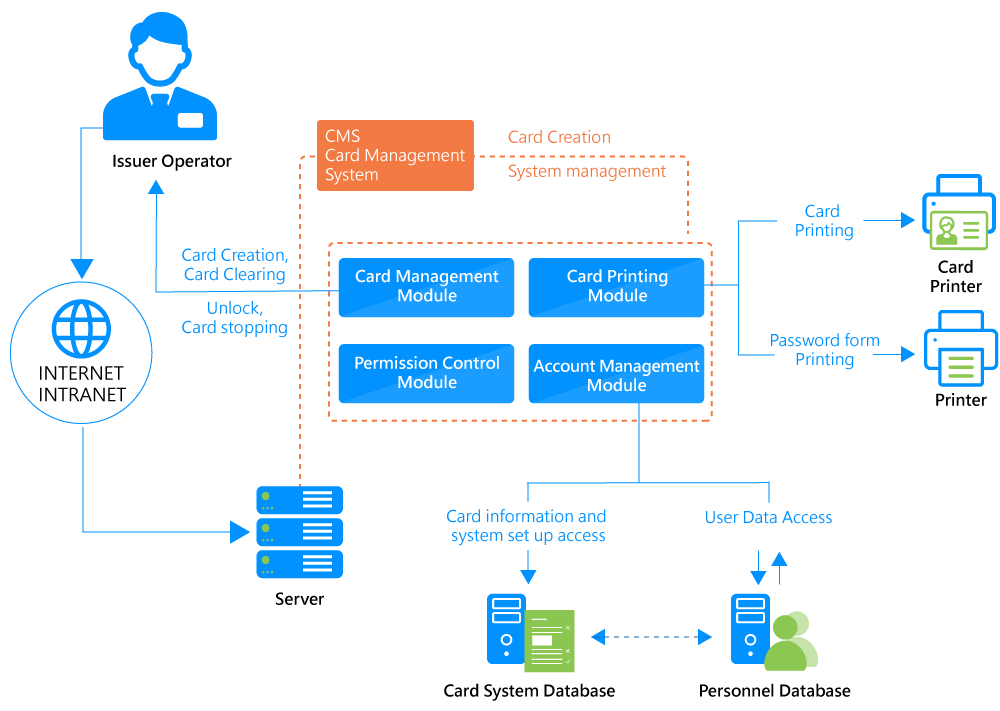
function
Download and installation of digital certificate
After a certificate is released by the CA system the CMS installs it in a smart card through the RA system. The CMS can generate key pairs required by PKI applications on formatted smart cards.
Apply for certificates
The CMS can apply certificate registration to the RA system for batch operation.
System permission control
The CMS features a web-based system management interface to set up and display permissions of users of individual card creation systems.
User data retrieval
The CMS can retrieve desired basic user data from an existing database for certificate application operation.
System audit log
All the message receipts and replies as well as system operations and setups are logged by the system for later auditing purposes.
Smart cards supported
The CMS supports PC/SC, Microsoft CAPI, PKCS#11, and card readers that keep X.509v3 digital certificates as well as compatible smart cards. (No restriction on length of keys. Any key length will work as long as it is supported by a smart card.)